Exploring Windows Inbuilt Security: Is it Any Good?
In an age where cyber threats loom large and data breaches make headlines with alarming frequency, the security of our digital devices is paramount. For many users, particularly those on Windows-based systems, the question of whether the built-in security measures provided by Microsoft are sufficient to safeguard against modern cyber threats is a pressing one. In this blog post, we'll delve into the efficacy of Windows' inbuilt security features and explore whether they provide adequate protection for users.
The Evolution of Windows Security
Over the years, Microsoft has made significant strides in enhancing the security features of its flagship operating system, Windows. Gone are the days when Windows was synonymous with vulnerabilities and frequent malware infections. Today, Windows boasts a robust suite of built-in security tools designed to mitigate a wide range of cyber threats.
Key Components of Windows Security:
- Windows Defender Antivirus: Formerly known as Microsoft Security Essentials, Windows Defender Antivirus is the built-in antivirus solution included with Windows. It offers real-time protection against viruses, malware, ransomware, and other malicious software. With regular updates and cloud-based scanning capabilities, Windows Defender is capable of detecting and removing threats efficiently.
- Windows Firewall: The Windows Firewall acts as a barrier between your computer and the internet, monitoring incoming and outgoing network traffic to prevent unauthorized access to your system. While basic in its functionality, the Windows Firewall provides essential protection against common network-based attacks and can be customized to suit individual security requirements.
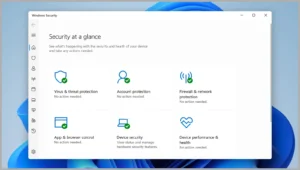
- Windows Security Center: The Windows Security Center serves as a centralized hub for managing various security settings and features on your device. From antivirus and firewall settings to device performance and account protection, the Security Center provides visibility into your system's security posture and offers recommendations for improving security.
- Device Encryption: Windows includes built-in support for device encryption, which helps protect your data in the event of theft or unauthorized access. BitLocker, Microsoft's proprietary encryption solution, encrypts the entire drive and requires authentication to decrypt and access data, adding an extra layer of security to your files and folders.
Strengths and Limitations:
While Windows' inbuilt security features offer a solid foundation for protecting your device and data, they are not without their limitations. While Windows Defender Antivirus provides adequate protection against many common threats, it may not offer the same level of advanced threat detection and remediation capabilities as some third-party antivirus solutions. Additionally, the effectiveness of Windows security measures can be influenced by factors such as timely updates, user awareness, and adherence to security best practices.
Enhancing Windows Security:
For users seeking additional layers of protection beyond what Windows' inbuilt security features provide, there are several steps you can take:
- Enable Automatic Updates: Ensure that Windows updates are enabled to receive the latest security patches and bug fixes from Microsoft.
- Use Strong Passwords and Enable Two-Factor Authentication: Implement strong, unique passwords for your accounts and enable two-factor authentication wherever possible to prevent unauthorized access.
- Install Third-Party Security Software: Consider supplementing Windows' inbuilt security features with third-party antivirus software for added protection against advanced threats.
- Practice Safe Browsing Habits: Exercise caution when clicking on links or downloading attachments from unknown or suspicious sources, and be vigilant against phishing attempts and social engineering tactics.
- Regularly Backup Your Data: Implement a regular backup strategy to protect your data against loss or corruption due to malware, hardware failures, or other unforeseen circumstances.
In conclusion, while Windows' inbuilt security features offer a solid foundation for protecting your device and data, they should be viewed as just one component of a comprehensive cybersecurity strategy. By combining built-in security measures with proactive security practices and, where necessary, additional security solutions, users can create a robust defence against the ever-evolving landscape of cyber threats.